Pokemon Twitch Overlay – Stream Overlay for Nuzlocke, Soul Link & More
Pokemon stream overlay for Twitch, YouTube & Kick. Shows your team, encounters, badges and run progress live on OBS, Streamlabs and any streaming software. For Nuzlocke, Soul Link, Soullocke and Randomizer. 3 layouts, fully customizable. 7-day free trial.
What you get immediately
The core overlay features at a glance before you watch the demo.
Real-time on stream
Team, encounters, badges and run progress update automatically in OBS.
Browser source
One link is enough. No download, no plugin, no manual refresh during the run.
For every setup
Fullscreen, Compact and Sidebar fit facecam, game capture and duo streams.
Match your branding
Colors, fonts, corners, sprites and panels can be configured directly.
Public viewer link
Share your run with chat so viewers can check team, encounters and progress anytime.
The Pokemon stream overlay for Twitch, YouTube and Kick
Soullinktracker is a Pokemon Twitch overlay that runs as a browser source in OBS, Streamlabs or any other streaming software. It displays your current team, encounter status, badges and run progress live on your stream – for every challenge variant.
The Pokemon overlay supports classic Nuzlocke runs, Soul Link challenges with visible pair connections, Soullocke variants and Randomizer runs. You choose the run type in the tracker and the overlay adapts automatically.
Everything updates in real time. When you catch a Pokemon, change your team, or log an encounter in the tracker, your chat sees the change instantly. No manual refreshing, no scene switching, no overlay restarts. The Pokemon stream overlay stays in sync at all times.
You can also share a public link with your viewers. Through this link they can check your current run status – team, encounters, links and progress – anytime, even when they are not watching the stream.
Three different layouts cover different stream setups: whether you use the full screen, need facecam panels, or prefer a compact sidebar layout. Colors, fonts, border radius and panel visibility are individually customizable.
What the overlay does
Every feature is built for streaming – not as a gimmick, but so your stream looks professional and your chat can follow along.
All challenge variants
Nuzlocke, Soul Link, Soullocke, Randomizer – the overlay automatically adapts to your run type. Soul Links show pair connections, Nuzlocke shows your team and encounter status.
Real-time updates
Every action in the tracker appears on the overlay instantly. Log encounters, swap Pokemon, change teams – your stream shows everything live.
Fully customizable
Choose from color presets (Cyan, Violet, Emerald, Rose), six fonts, five border radius levels and different panel layouts. Your overlay matches your branding.
3 layout options
Fullscreen with side panels, Compact for smaller streams, and a Sidebar layout for vertical areas. Each layout supports facecam and game panels.
Animated & static sprites
Show Pokemon sprites as static images or animated GIFs. Your chat immediately sees which team is currently active.
Badges & run number
Display current progress with gym badges and the run number. Perfect for marathon streams or multiple Nuzlocke attempts.
Share viewer link
Share a public link with your chat. Your viewers can check team, encounters and run progress anytime – even when they are not watching the stream.
How the Pokemon overlay looks on stream
The product video shows the tracker, SoulLink creation and OBS overlay in a real streaming environment.
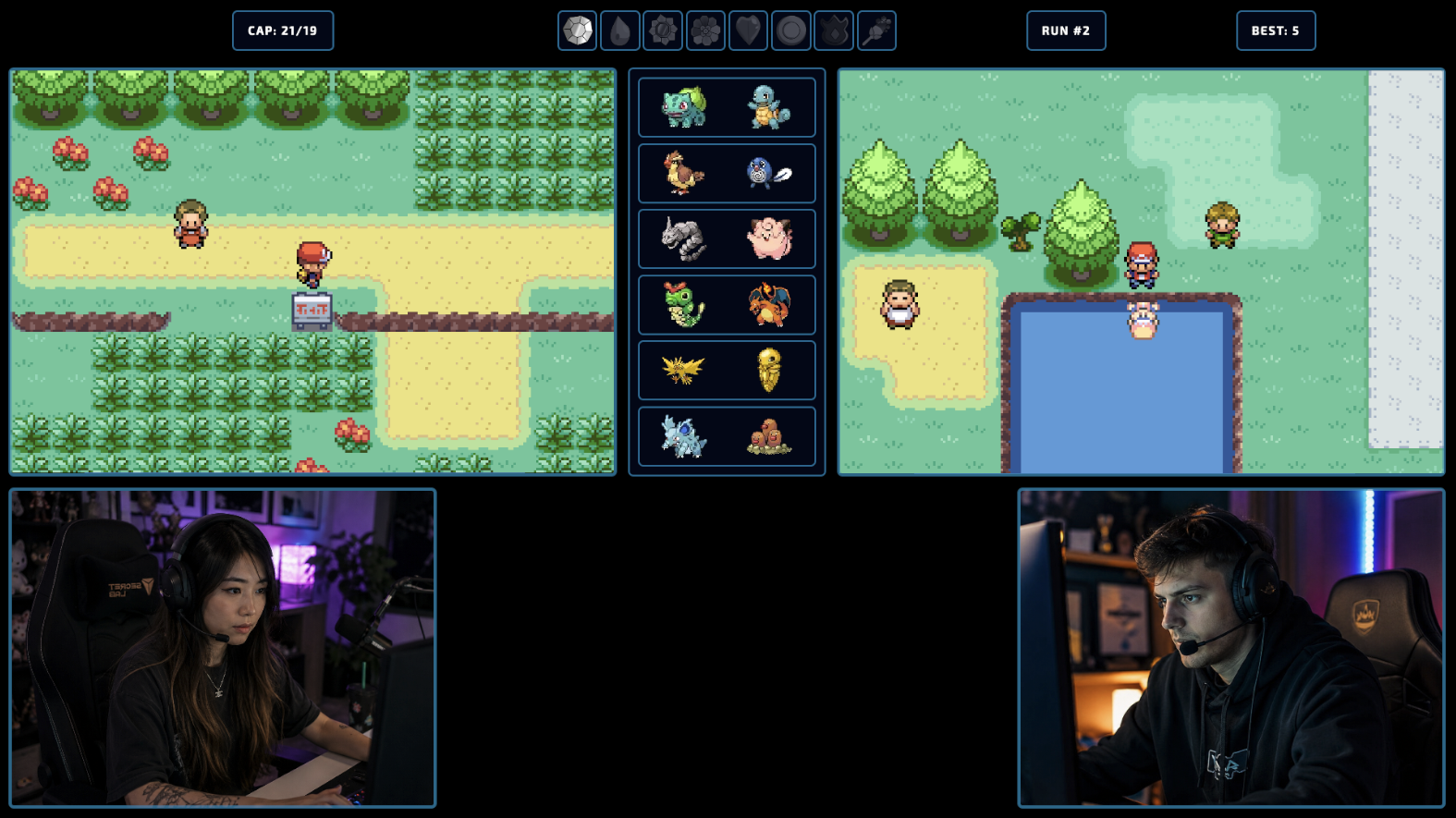
Without overlay
With overlay
Set up your Pokemon overlay in 4 steps
Setup takes less than two minutes. No download, no installation – just add a browser source in OBS and your Pokemon overlay is live.
Create a run & configure the overlay
Create a Nuzlocke, Soul Link or Randomizer run in the tracker and choose your layout, colors and font in the overlay settings.
Copy the browser source URL
In the overlay section you will find a URL. Copy it – it contains all settings and connects to your run automatically.
Add as browser source in OBS
Add a new browser source in OBS, Streamlabs or your streaming software and paste the URL. Recommended resolution: 1920×1080.
Play – the overlay updates live
As soon as you log encounters, change teams or lose Pokemon in the tracker, your stream sees the updates in real time.
Three layouts for every stream setup
Each layout adapts to your setup. Panels, colors and visibility are individually configurable.
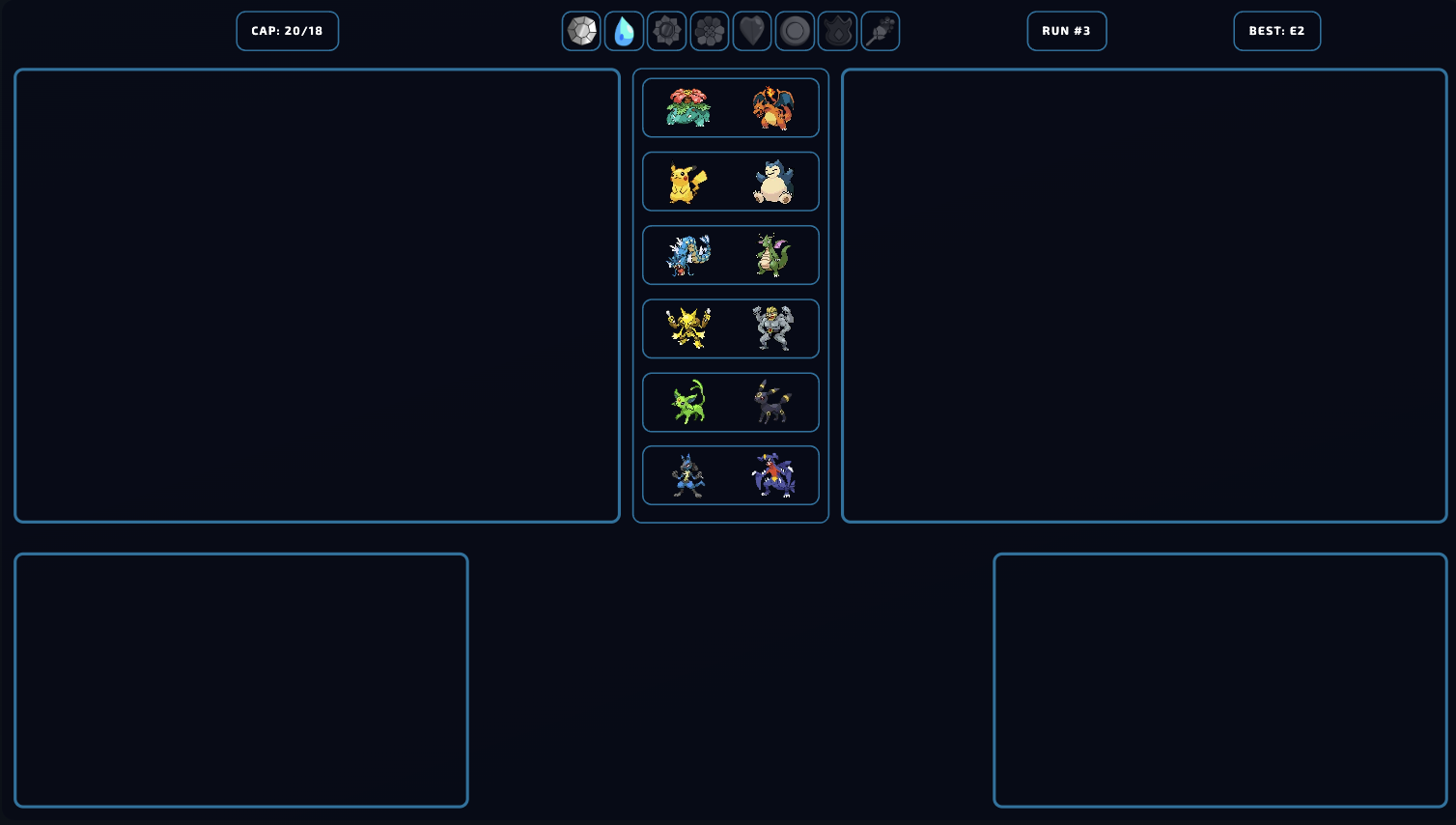
Fullscreen
Everything at a glanceThe main layout for full-screen streams. Facecam panels on both sides, game panels in the center, team grid below. Ideal for duo streams and Soul Link challenges.
- ✓Side panels for facecam & game capture
- ✓Space for up to 6 Pokemon pairs
- ✓Top bar with badges and run number

Compact
Small but completeReduced layout for streams that want more room for the game. Shows team and run status in a compact format without sacrificing important information.
- ✓Minimal footprint
- ✓Perfect as side or corner overlay
- ✓All core info visible
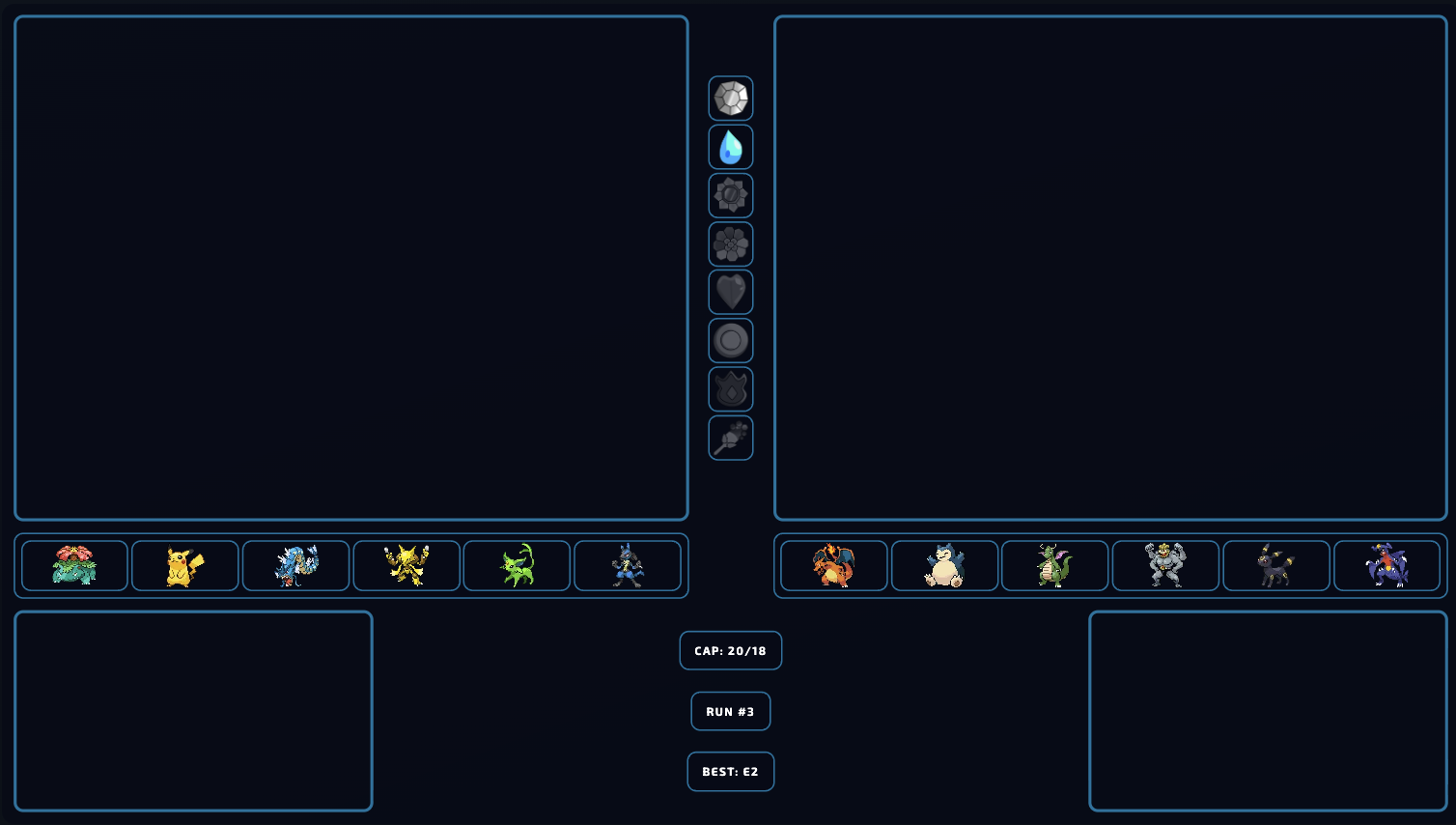
Sidebar
Vertical and clearVertical layout for streams with a sidebar area. Stacks team, run status and badges vertically. Works especially well on 16:9 streams with a side overlay area.
- ✓Vertical arrangement
- ✓Ideal for narrow overlay areas
- ✓Clean information separation
Pricing
7 days freeThe first 7 days are free – after that, less than the price of an emote slot.
Monthly
€2.99/ month
Yearly
€19.99/ year
- ✓All 3 overlay layouts
- ✓Real-time stream updates
- ✓Shareable viewer link
- ✓Overlay across all your game configs
- ✓Nuzlocke, Soul Link, Randomizer
- ✓All customization options
Frequently asked questions about the Twitch overlay
Everything you need to know before setting up.
How much does the Pokemon Twitch Overlay cost?
Which challenge variants are supported?
Does the Pokemon overlay update live on stream?
Which streaming software does the overlay work with?
Can I customize colors and fonts?
What resolution should I use in OBS?
Can my viewers see the run outside of the stream?
Does the overlay work for YouTube or Kick streams too?
Do I need to download or install anything?
Your Pokemon stream overlay is ready
Set up your Pokemon Twitch overlay in under two minutes. 7-day free trial, no download, live on your stream instantly.